
The usual way to extend an AI app is also the dangerous way
The Model Context Protocol has become the standard way to give an AI assistant access to outside systems, and it works. The common desktop pattern, though, is that the app launches MCP servers as local subprocesses, inheriting your environment variables, your filesystem, and your network, on the strength of a config file you pasted from a README.
Skill and plugin systems tend to follow the same shape. A package arrives, it contains instructions plus an install hook, and running the hook is how the feature works. At that point the security question is no longer "what is this AI allowed to do" but "what did that script do."
The protocol authors are direct about the exposure. The MCP specification's Streamable HTTP transport requires servers to validate the Origin header and bind to localhost when running locally, because otherwise a remote web page can reach a local MCP server through DNS rebinding. The separate security best practices document catalogues further failure modes, including confused-deputy attacks through proxying servers.
On Device AI exists because people want AI help without shipping their work to someone else's server. Adding a tool system that quietly reopens that hole would defeat the point. So the first release deliberately supports less than the protocol allows.
What the MCP client does and does not do
MCP support is tool-only. Tools are the part of the protocol with a clear consent story: the model asks to run a named operation with typed arguments, and the app can inspect, gate, and correlate that request. The remaining primitives are not wired up yet.
| Capability | First release | Reasoning |
|---|---|---|
| Remote Streamable HTTP servers | Supported over HTTPS | An endpoint you chose, reachable without granting local process privileges. |
| stdio / local subprocess servers | Rejected | A process command is refused with guidance. No subprocess is launched. |
| Tool discovery and invocation | Supported | Runs through the existing tool registry, approval, and cancellation path. |
| Prompts, resources, roots, sampling, elicitation | Not exposed | Never displayed, fetched, invoked, or injected into model context. |
Server instructions from initialization | Ignored | A server does not get to write part of your system prompt. |
| Authentication | Static bearer token or secret header | Stored in the Keychain. OAuth flows report as unsupported rather than half-working. |
| Cleartext HTTP | macOS loopback only, after a warning | For servers you run yourself on the same machine. |
A server that advertises tools alongside unsupported capabilities still connects; only its valid tools get registered. A server offering no tools at all shows up in Settings as having nothing available in this release, and your other servers and built-in tools keep working.
Connecting a server, end to end
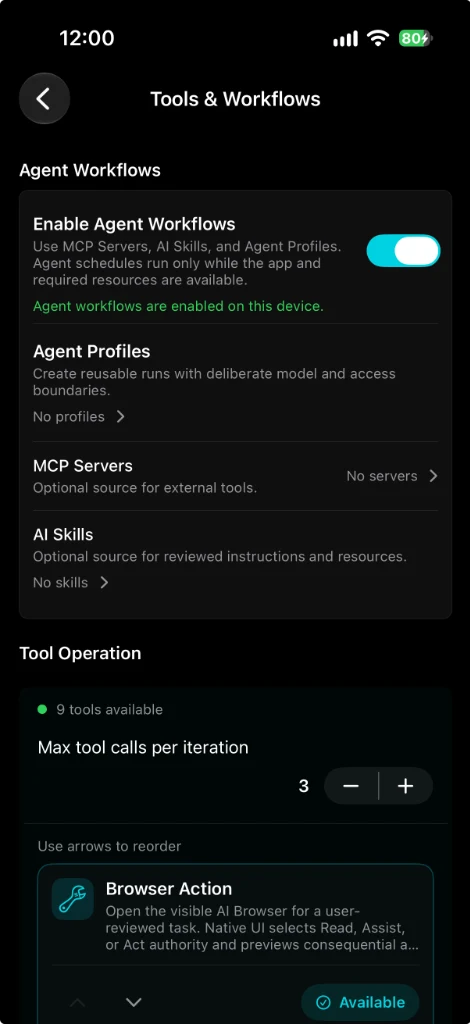
- Turn on Enable Agent Workflows.
Open Settings > Tools & Workflows. The first group, Agent Workflows, holds one switch that governs Agent Profiles, MCP Servers, and AI Skills together, with Tool Operation and the built-in tools below it. The setting is per device. Turning it off later stops new workflow activity without deleting your servers, skills, profiles, schedules, or run history.
- Enter a name and an HTTPS endpoint.
Add a token or secret header only if the server requires one. Non-secret configuration goes to the database; the secret goes to the Keychain under the server's stable identity.
- Test, then activate.
A server cannot even be tested until it has a name, and the connection test is separate from activation, so nothing registers tools before you have watched it connect.
- Select individual tools where you want them.
Discovered tools appear grouped by server in the conversation, Role, Flow Agent, and Subagents selectors. If a server exposes three tools and you enable one, the other two stay unavailable to the model.
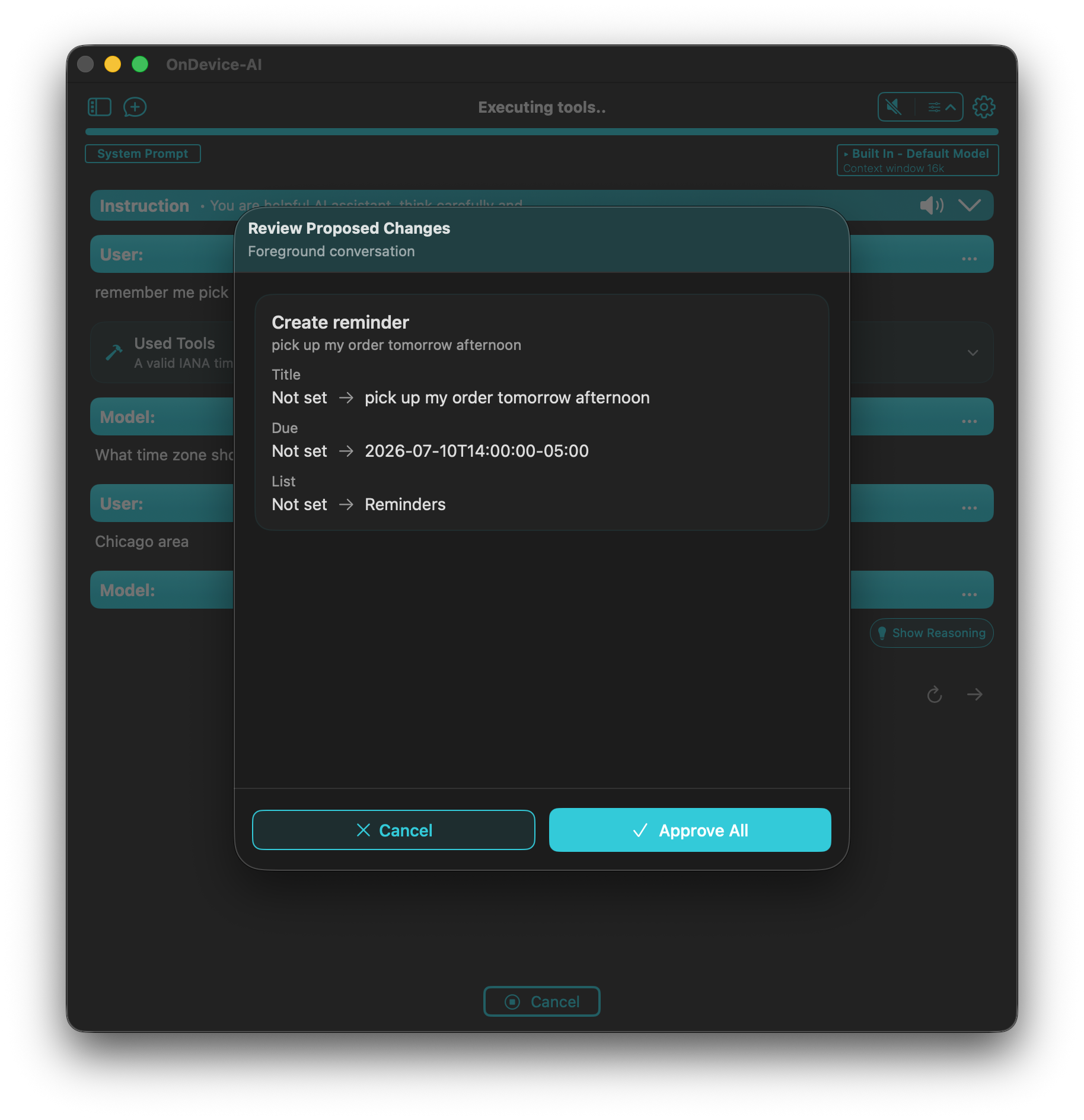
- Approve the first call.
A newly discovered external tool requires approval until a reviewed local policy classifies the sanitized operation. You see a preview the app generated, not a description the server wrote about itself.
Four details that decide whether this is actually safe
Annotations do not grant trust. MCP lets a server tag its tools as read-only, idempotent, destructive, or auto-approvable. On Device AI reads those hints as untrusted metadata. If local policy classifies the sanitized operation as approval-required, approval is required, whatever the server claims about itself.
Results are content, never commands. Tool output is bounded, sanitized, and converted into ordinary result text. Structured JSON is serialized into that text instead of being handed over as a transport envelope. If a result happens to contain keys shaped like an internal attachment, authorization, or persistence marker, it stays untrusted text; no file read, approval, or control action is resolved from its shape. Images, audio, blob-backed resources, and resource links are reported as unsupported rather than silently downloaded.
Two servers can expose the same tool name without colliding. Each tool carries a stable internal identity of the form mcp:<serverUUID>:<toolName>, used for persistence, selection, registry lookup, and approval policy. Because model APIs will not accept that string, each execution freezes a separate legal wire name starting with mcp_, limited to 63 characters of ASCII letters, digits, _, and -, with a fixed-width hash appended whenever truncation or a collision could blur two identities. Returned calls map back to the stable identity before any handler runs.
A dead server does not take chat down with it. The tool catalog is cached, warmed with bounded concurrency, and marked for freshness, so submitting a message never waits on discovery or an unreachable host. Unavailable tools are simply not offered to the model as executable. If a Streamable HTTP session expires mid-flight, signalled by HTTP 404 together with JSON-RPC error -32001, the runtime rebuilds the session and retries at most once for read-only or idempotent work. A mutation is never replayed automatically; it fails recoverably with its original correlation identity so you can decide.
When the tool list is bigger than the model's context
This problem is specific to running small local models. Ten verbose MCP schemas can eat the context window of a 4B model before your question arrives. The usual workaround is to send everything and hope, or to silently drop tools.
Instead, tool metadata is sanitized and capped per description and per schema, then measured against a budget calculated as a fraction of the execution's effective context window. If the selection overflows and deferral would actually save tokens, eligible tools move behind three app-owned meta-tools, tool_search, tool_inspect, and tool_invoke, and the model receives a bounded discovery listing instead of every schema. Approval-required tools always stay inline where the approval manager can see them. When the required inline set still will not fit, submission fails before inference with guidance to trim the selection, because the alternative is routing a protected call around its own gate.
Installable AI skills: instructions, not executables
A skill is a package you import from a file. Inside it are a manifest, a SKILL.md instruction body, optional validated Role, Flow Agent, or Subagents definitions, a list of requested built-in tool identifiers, and bounded read-only supporting resources.
What is not inside is a program. The runtime does not execute scripts, binaries, shell commands, or package hooks, and it does not execute commands that the instructions merely mention. If a package contains executable content or asks for command execution, validation rejects or excludes it and no process starts. A skill changes how an agent reasons and what it knows about your conventions. It does not gain a foothold on your machine.
The installer treats every archive as hostile until proven otherwise.
| Check | Behavior |
|---|---|
| Absolute paths, parent traversal, symlinks, hard links, case-colliding paths | Rejected before anything is published |
| More than 1,000 files or more than 100 MB expanded | Extraction stops, staging directory removed, installed version untouched |
| Integrity | Deterministic SHA-256 hash over the whole directory, re-verified at the destination before commit |
| Interrupted update | Rollback and committed-cleanup markers let startup either restore the old tree or keep the verified new one |
| Files changed outside managed installation | Hash mismatch marks the skill changed or disabled pending review |
Before anything is published you get a preview: where the package came from, its version and hash, the instructions and resources it contains, the agent definitions it wants to import, the built-in tools it requests, and any conflicts with your existing data. Listing a tool is a request, not a grant. Confirming the install does not enable or approve those tools. If an imported Flow Agent name collides with one you built, the preview offers a rename or a new revision instead of overwriting your work, and a later skill update will not replace a definition you have edited just because the package version is newer.
Skills are enabled per agent, and loaded only when needed
Installing a skill adds it to a catalog. It does not inject anything anywhere. Skills become active only when you enable them on a specific Agent Profile, which is the durable object that ties one Role, Flow Agent, or Subagents definition to model defaults, a tool allowlist, a workspace scope, and a schedule.
At run time the profile freezes its revision, its enabled skill versions, and content-addressed references to their files. The prompt then carries app safety and tool policy first, the selected agent definition next, and a short attributed listing of available skills after that, in the order you chose. Your task stays your own input. If that listing would exceed its share of the context window, it degrades deterministically from full metadata to trimmed metadata to names only, rather than failing a run because the descriptions were wordy.
Full instruction bodies are pulled on demand. Two internal meta-tools, skill_load and skill_read, fetch one skill's frozen instructions or one of its manifest-declared text resources, inside per-call and per-execution byte budgets. They exist only for executions that have enabled skills, never appear in ordinary tool selectors, and consume normal tool-loop limits. The important guarantee is what loading does not do: reading a skill's instructions never widens the frozen tool allowlist, entitlement, approval policy, workspace, credential access, or filesystem scope. Undeclared files in the package stay installed for provenance and stay invisible to the model.
The boundary list is short and absolute. A skill cannot carry working credentials, install or activate an MCP server, expand a filesystem bookmark, change subscription state, or grant tool approval. If validation finds a secret or an MCP activation payload, it strips or rejects it and the Keychain is left alone.
Deliberately missing, for now
- No skill marketplace. Import, update, disable, and uninstall are local and user-initiated. Remote cloning and search wait until the trust model for them is specified.
- The model cannot install anything. If a response asks for a repository install, the app declines and points at the local import flow.
- No OAuth. A server needing browser authorization reports that mode as unsupported. No callback listener opens and no partial authorization state is saved.
- No stdio servers. Which rules out a large share of published MCP servers today. That is a real cost, accepted on purpose.
- Background discovery never interrupts you. Catalog warming at launch will not raise a Keychain prompt; a credential needing interaction leaves the previous catalog in place until you act.
- Schedules are not a server. Agent schedules run only while the app and the resources they need are available. On a phone, that is a real constraint, and the settings screen says so rather than implying cron-like reliability.
- A run cannot widen its own boundaries. An Agent Profile run cannot create schedules, write persistent memory, open new MCP connections, or grant itself workspace permissions. It follows the same tool selection and approval requirements as an ordinary chat.
One caveat belongs here rather than in a footnote: a tool you approve receives the arguments you approved. Choosing to trust a server is a real decision, and no amount of local policy substitutes for picking endpoints you have reason to trust.
Why the restraint is the feature
Most AI tool ecosystems ask for trust in a single step: paste this config, run this installer, and the assistant gains a capability. The trade is invisible because nothing appears to happen.
On Device AI already refuses the easy version of that bargain elsewhere. There is no analytics and no account, local models are the default, and cloud providers stay off until you configure them. External tools and imported skills are the first features that genuinely could have undermined that stance. Keeping approval authoritative, keeping secrets in the Keychain, keeping skill packages declarative, and keeping every tool opt-in per conversation is what lets the app take on outside capability without becoming a different kind of product.
The practical result is that your local agents can now reach a ticket tracker, an internal search endpoint, or a company knowledge service, and follow the working conventions you packaged as a skill, while the sensitive reasoning stays on your own hardware and every consequential action still waits for you.
Frequently asked questions
Can On Device AI connect to MCP servers?
Yes. It includes a tool-only Model Context Protocol client for remote Streamable HTTP servers. Turn on Enable Agent Workflows in Settings > Tools & Workflows, add an HTTPS endpoint under MCP Servers, test the connection, activate the server, then select individual discovered tools for a conversation, Role, Flow Agent, or Subagents definition.
Does On Device AI run local MCP servers as subprocesses?
No. The first release is remote HTTPS only. A process command or stdio configuration is rejected with clear guidance and no subprocess is launched. Loopback HTTP can be enabled on macOS after an explicit warning, and credentials are never forwarded to a different origin through a redirect.
Where are MCP credentials stored?
Bearer tokens and secret headers live in the Keychain under the server's stable identity. They are excluded from database configuration rows, logs, exports, approval previews, prompts, model context, and skill packages. Deleting a server closes its connections and removes its credentials without affecting other servers.
Can an MCP server approve its own tool calls?
No. Read-only, destructive, idempotent, and auto-approval annotations are untrusted metadata. Every newly discovered external tool requires approval until a reviewed local policy classifies the sanitized operation, and the locally generated preview is authoritative.
What is an installable AI skill?
A declarative package containing a manifest, a SKILL.md instruction file, optional validated Role, Flow Agent, or Subagents definitions, requested built-in tool identifiers, and bounded read-only resources. The runtime never executes scripts, binaries, shell commands, package hooks, or commands mentioned in the instructions.
Can an installed skill enable tools or add credentials by itself?
No. A skill cannot contain effective credentials, install or activate MCP servers, expand filesystem bookmarks, change subscription state, or grant approval. Requested tool identifiers stay declarative and still pass entitlement, scoped selection, and approval checks. Skills are enabled per Agent Profile rather than injected globally.
Can the model install a skill from the internet on its own?
No. Import, update, disable, and uninstall are local and user-initiated. Marketplace search, remote cloning, and model-initiated installation are unavailable. A chat response asking for a repository install is declined and redirected to local import.